
Overton currently has over 650,000 topics connected to policy documents. To use them in research, we suggest refining your search first (using the advanced search, applying filters, etc). If you are working with topics specifically, using the API will allow you to see more than the filter view (email support@overton.io if you are interested in API access).
We also identify “overrepresented” or “unusually common” topics that appear more frequently in specific contexts than in the general policy document collection. For example, when viewing an individual’s policy citations, the blue topics shown are those that appear more frequently in documents citing their work compared to all policy documents.
The topics filter does have a limit, meaning smaller or more niche topics may not appear unless you first search for related keywords to bring them into the filtered results.
Workarounds for Finding Smaller Topics
To access smaller topics that don’t appear in the main filter:
- Perform a keyword search for their topic of interest
- Examine the topics filter after the search results appear
- Look for additional relevant topics that now show up in the sidebar
- Add the desired topic filter, then remove the original keyword search
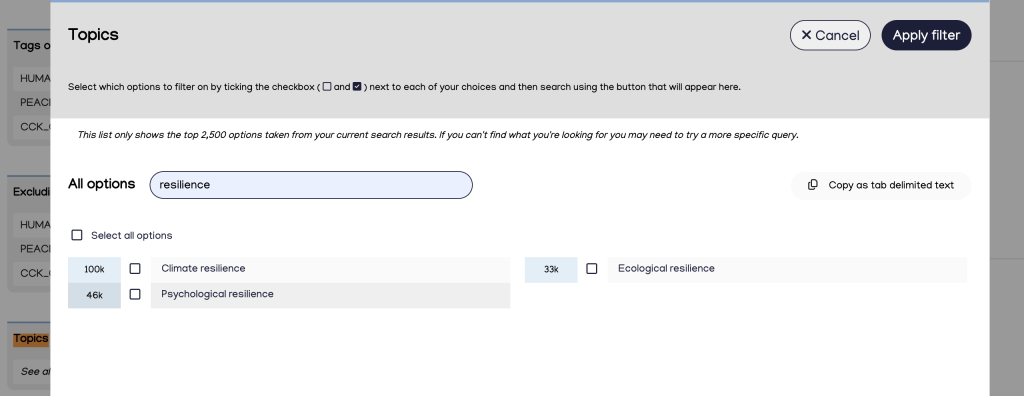
For example, after searching for the keyword “resilience,” the topics filter reveals additional options like “urban resilience” and “resilience (engineering and construction)” that weren’t visible in the initial topic list.
Combining Topics
Currently, topics cannot be combined using AND logic. To search for multiple topics:
- Use keyword strategies with proximity syntax instead of topic filters
- Export results from separate topic searches and find overlapping Overton IDs using Excel or scripts
- Search for the relevant Overton IDs to see and combine related topics using the topics filter