
Use our People Search to find individuals or groups cited or mentioned in policy documents.
Search with a single name or a list of names to discover evidence of policy attention. This article will explain how the People search works and outline some tips users can employ to get effective and accurate results.
How does the People search work?
Before you begin a People search, it helps to understand how we populate our “People” data. Here is an overview of how Overton does this:

If we can (1) find a DOI associated with a scholarly reference and (2) find affiliation information associated with that DOI in OpenAlex, then a person will appear in the People results.
See - Authors with no People results & alternative searches
How to run a People search
Best Practices
There are a few best practices that you can employ to make your People search as effective as possible.
You can search for variants of your name using the ‘list of names’ search box. And to
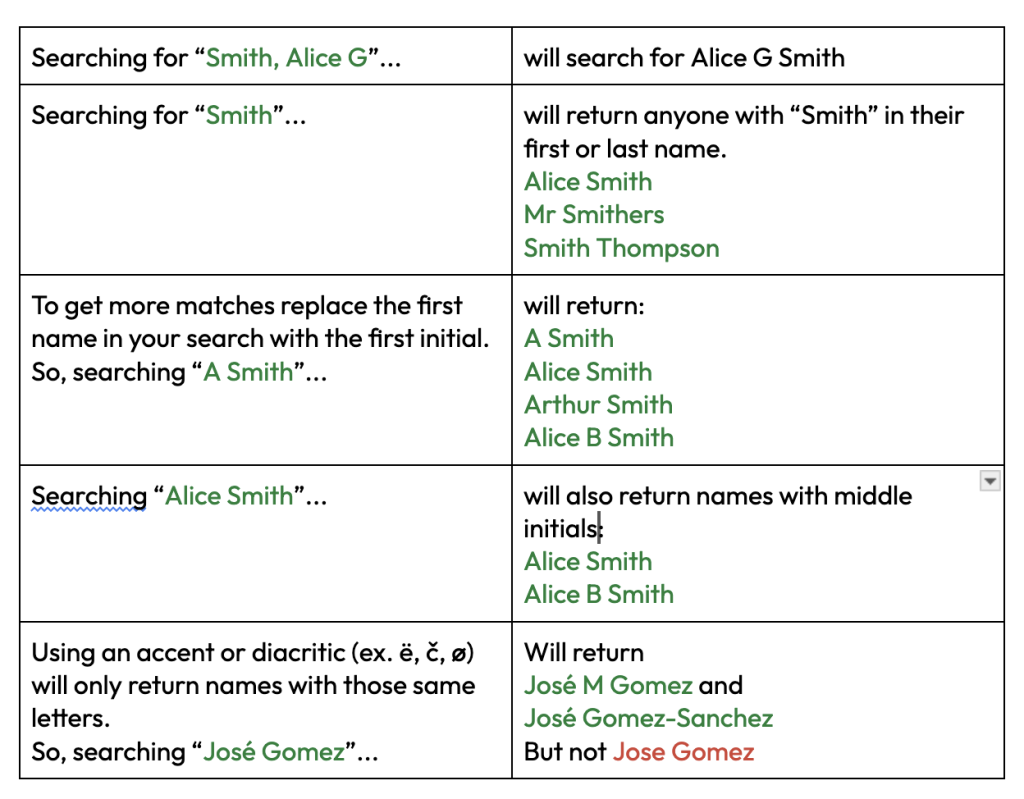
Searching ‘José Gomez’ will return results for ‘José M Gomez’ and ‘José Gomez-Sanchez’ but not ‘Jose Gomez’.
If your name uses diacritics or accents, consider searching for your name using the variants that use diacritics and those that do not to ensure no results are missed.
The reason for this is because you could end up with multiple pages of People results to review in order to find your own results. A further limitation is that users can only select results on one page of People results at one time. It is a known limitation that we are working on.
You can search using identifiers from our Start page or from the ‘Scholarly Articles search’ tab under the ‘Discover’ menu.
As this method of searching requires an exact match to the names on the list it is not the best way of searching for large lists of individuals. With a large list, it can be difficult to see when there are no results for an individual and therefore, difficult to know if alternative methods of searching will be more useful.
If you want to search for large groups of people from your organisation simultaneously, reach out to support@overton.io for more specific guidance.
Select the entries that match the individual you are looking for, then click ‘Explore’ to view the related policy documents or scholarly articles linked to those profiles.
Example People searches
The People search is what is called a fuzzy search. Your results will be impacted by the format you use to search for an individual (i.e., full name, initial and surname, etc). To get more matches, replace the first name in your search with the first initial.
Here are some example People searches and what results they will yield:
People search results
People Search results display:
- Names that match your search
- An affiliation for each individual
- The number of cited policy documents
- The number of scholarly articles cited in policy
- Key sources they appear in and topics of the policy documents they are cited in most
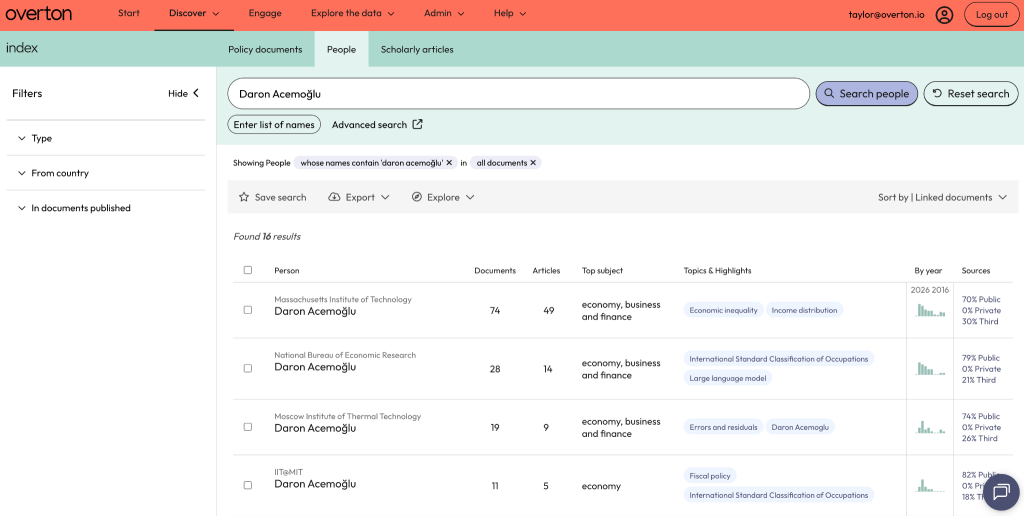
If your search returns a single entry for the person you are looking for, click:
- The number under Documents to view policy documents that cite or mention them
- The number under Articles to view their scholarly publications cited in policy
Selecting and viewing multiple results
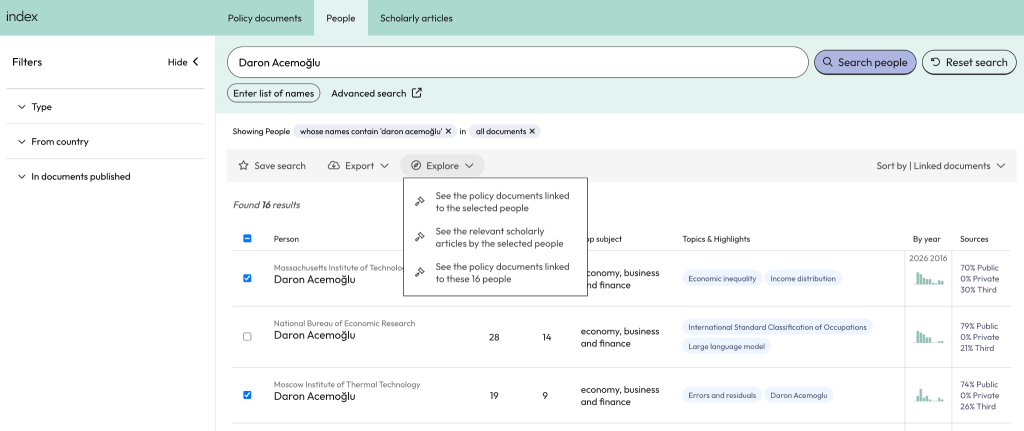
A person may appear multiple times in your results if they have published under different affiliations over the years.
Select the entries that match the individual you are looking for, then click ‘Explore’ to view the related policy documents or scholarly articles linked to those profiles.
Filter by citations or mentions
You can filter results to see only citations or only mentions by clicking on the ‘Type’ filter and selecting ‘Only people cited’ or ‘Only people mentioned.’
See: What is a People mention? & How does Overton find people mentioned in policy documents?
Other ways of searching for policy citations
The People search is not the only way to find individuals’ policy citations in Overton. There are other methods which are perhaps a bit easier and help avoid some of the issues around common names, name variants or having multiple institutional affiliations.
At minimum, researchers should create an Overton Profile to make it easy to search for and track their policy citations.
See: Setting up your Overton Profile & Search using your Overton Profile
All users can also search for citations in policy using DOIs and other identifiers like PMIDs, ORCID or ISBNs either from the Start page or from our Scholarly Articles search. This method is highly effective and avoids issues around name variants.
See: Search using DOIs and other identifiers